Cloud computing infrastructure has become the foundation of modern digital business. From startups launching SaaS products to government agencies modernizing legacy systems, organizations rely on cloud environments to deliver scalable, secure, and high-performance services. Building a cloud computing infrastructure is not simply about renting servers online. It involves designing a complete ecosystem that includes networking, storage, compute resources, security controls, monitoring systems, automation pipelines, disaster recovery strategies, and governance policies.
As businesses accelerate the adoption of digital transformation, cloud infrastructure provides faster innovation, lower operational costs, global scalability and better resiliency. Companies like Tek Yantra help organizations design and implement cloud environments that support modernization, cybersecurity, DevSecOps, and enterprise application delivery.
This article explains how to build a cloud computing infrastructure step by step, including architecture planning, technology choices, security implementation, deployment strategies, and operational best practices.
What is Cloud Computing Infrastructure?
Cloud computing infrastructure refers to the collection of hardware and software components used to deliver cloud services over the internet. These components include:
- Virtual machines
- Storage systems
- Networking resources
- Databases
- Security systems
- Monitoring tools
- Container orchestration platforms
- Automation and CI/CD pipelines
Instead of maintaining physical servers inside a local data center, organizations use cloud providers such as the following:
- Amazon Web Services (AWS)
- Microsoft Azure
- Google Cloud Platform
Cloud infrastructure can be deployed in several models:
- Public Cloud
- Private Cloud
- Hybrid Cloud
- Multi-Cloud
Each model serves different business and compliance requirements.
Why Businesses Need Cloud Infrastructure
Modern organizations adopt cloud infrastructure for several important reasons.
Scalability
Cloud systems can quickly scale resources up or down depending on traffic and workloads. This is especially useful for ecommerce stores, SaaS applications, and enterprise platforms with fluctuating demand.
Cost Optimization
Businesses avoid large upfront investments in physical servers and data centers. Instead, they pay for resources based on usage.
Faster Deployment
Applications can be launched in minutes rather than waiting weeks for hardware procurement and setup.
Security and Compliance
Major cloud providers offer enterprise-grade security features, compliance certifications, and monitoring tools.
Disaster Recovery
Cloud platforms provide backup and recovery systems that protect organizations from outages and data loss.
Global Availability
Applications can be deployed across multiple regions worldwide to improve performance and reduce latency.
Step 1: Define Business and Technical Requirements
Before building any infrastructure, organizations must identify their goals and requirements.
Questions to consider include:
- What applications will run in the cloud?
- How many users are expected?
- What compliance standards are required?
- What are the uptime expectations?
- What is the expected traffic growth?
- What security requirements exist?
- What budget constraints must be followed?
For example:
- A startup may prioritize speed and cost efficiency.
- A healthcare organization may prioritize HIPAA compliance.
- A government agency may focus heavily on cybersecurity and governance.
Requirement gathering is the foundation of successful cloud architecture.
Step 2: Choose the Right Cloud Deployment Model
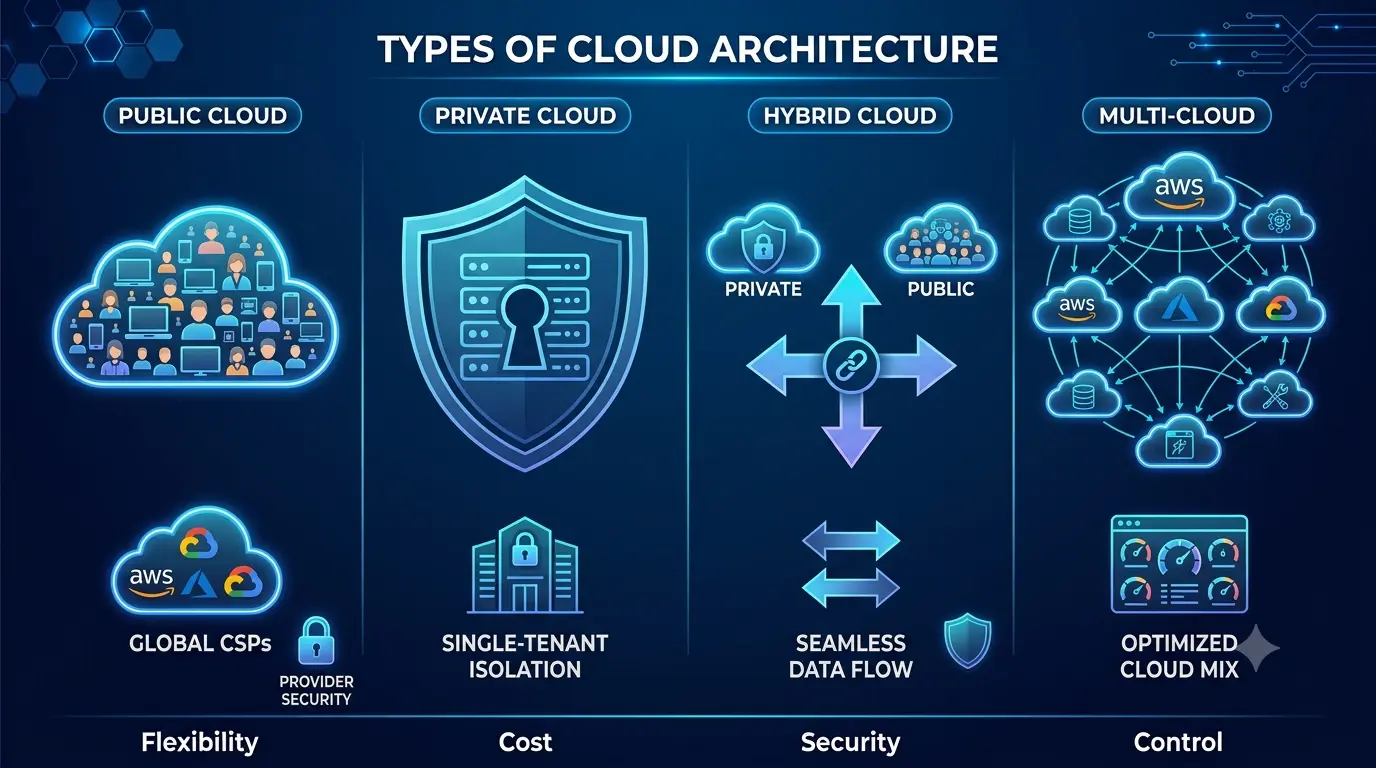
Different businesses require different deployment models.
Public Cloud
Public cloud infrastructure is hosted by third-party providers like AWS or Azure.
Advantages:
- Lower cost
- High scalability
- Easy deployment
- Minimal hardware management
Best for:
- Startups
- SaaS businesses
- Web applications
Private Cloud
Private cloud infrastructure is dedicated to one organization.
Advantages:
- Greater control
- Enhanced security
- Better compliance management
Best for:
- Financial institutions
- Government systems
- Highly regulated industries
Hybrid Cloud
Hybrid cloud combines public and private infrastructure.
Advantages:
- Flexible workloads
- Better data control
- Improved disaster recovery
Best for:
- Large enterprises
- Organizations with legacy systems
Multi-Cloud
Multi-cloud environments use multiple cloud providers simultaneously.
Advantages:
- Vendor redundancy
- Better availability
- Reduced vendor lock-in
Best for:
- Enterprise organizations
- Global applications
Step 3: Select a Cloud Provider
Choosing the right cloud provider depends on organizational goals.
AWS
AWS is known for:
- Large service ecosystem
- Mature infrastructure
- Global availability
- Strong enterprise support
Best for:
- Enterprise scalability
- Advanced architectures
- DevOps automation
Microsoft Azure
Microsoft Azure integrates well with Microsoft environments.
Best for:
- Windows workloads
- Microsoft enterprise ecosystems
- Government environments
Google Cloud Platform
Google Cloud Platform excels in:
- Data analytics
- Artificial intelligence
- Kubernetes management
Best for:
- AI-driven businesses
- Data-intensive workloads
Step 4: Design the Cloud Architecture
Architecture planning determines how infrastructure components interact.
Core architecture areas include:
- Networking
- Compute resources
- Storage systems
- Security layers
- Monitoring
- Disaster recovery
A well-designed architecture improves scalability, resilience, and operational efficiency.
Step 5: Build the Network Infrastructure
Networking is one of the most important parts of cloud infrastructure.
Virtual Private Cloud (VPC)
A VPC creates isolated cloud networks for secure communication.
Key components include:
- Subnets
- Route tables
- Gateways
- Firewalls
- Access control lists
Public and Private Subnets
Public subnets host internet-facing services like:
- Load balancers
- Web servers
Private subnets host:
- Databases
- Internal APIs
- Backend systems
This separation improves security.
Load Balancers
Load balancers distribute traffic across multiple servers.
Benefits:
- High availability
- Improved performance
- Fault tolerance
DNS Management
DNS services route user traffic to applications.
Common tools include:
- AWS Route 53
- Azure DNS
- Cloud DNS
Step 6: Deploy Compute Resources
Compute resources power cloud applications.
Options include:
Virtual Machines
Virtual machines simulate physical servers.
Examples:
- AWS EC2
- Azure Virtual Machines
- Google Compute Engine
Use cases:
- Legacy applications
- Enterprise software
- Custom server environments
Containers
Containers package applications with dependencies.
Benefits:
- Faster deployment
- Portability
- Efficient resource usage
Popular tools:
- Docker
- Kubernetes
Serverless Computing
Serverless architecture runs code without managing servers.
Examples:
- AWS Lambda
- Azure Functions
- Google Cloud Functions
Benefits:
- Reduced operational overhead
- Automatic scaling
- Pay-per-use pricing
Step 7: Implement Cloud Storage
Storage systems manage data availability and durability.
Object Storage
Used for:
- Images
- Videos
- Backups
- Static assets
Examples:
- AWS S3
- Azure Blob Storage
Block Storage
Used for:
- Databases
- Operating systems
- High-performance applications
Examples:
- AWS EBS
- Azure Managed Disks
File Storage
Provides shared file systems across servers.
Examples:
- Amazon EFS
- Azure Files
Step 8: Configure Databases
Databases store and manage application data.
Relational Databases
Examples:
- PostgreSQL
- MySQL
- SQL Server
Best for:
- Structured transactions
- Enterprise applications
NoSQL Databases
Examples:
- MongoDB
- DynamoDB
- Cassandra
Best for:
- Flexible schemas
- High scalability
Managed Database Services
Cloud providers offer managed database solutions that reduce administrative overhead.
Examples:
- Amazon RDS
- Azure SQL Database
- Cloud SQL
Benefits:
- Automated backups
- Patching
- High availability
Step 9: Build Security Into the Infrastructure
Security should never be added later. It must be integrated from the beginning.
Identity and Access Management (IAM)
IAM controls user permissions and access levels.
Best practices:
- Least privilege access
- Multi-factor authentication
- Role-based access control
Network Security
Use:
- Firewalls
- Security groups
- Web application firewalls (WAF)
- VPNs
Encryption
Encrypt:
- Data at rest
- Data in transit
Use:
- TLS/SSL certificates
- Encryption key management systems
Security Monitoring
Organizations should continuously monitor threats and vulnerabilities.
Security tools may include:
- SIEM platforms
- Threat detection systems
- Intrusion monitoring
- Endpoint protection
Companies like Tek Yantra help organizations implement cloud security strategies, SOC operations, DevSecOps pipelines, and infrastructure monitoring solutions to improve operational resilience.
Step 10: Implement DevOps and Automation
Manual infrastructure management is inefficient and error-prone.
Automation improves:
- Deployment speed
- Consistency
- Reliability
Infrastructure as Code (IaC)
IaC automates infrastructure provisioning.
Popular tools:
- Terraform
- AWS CloudFormation
- Pulumi
Benefits:
- Version control
- Faster deployments
- Repeatable environments
CI/CD Pipelines
Continuous Integration and Continuous Deployment automate software delivery.
Popular tools:
- Jenkins
- GitHub Actions
- GitLab CI/CD
- Azure DevOps
Benefits:
- Faster releases
- Reduced human error
- Improved testing
Container Orchestration
Kubernetes automates:
- Scaling
- Deployment
- Service management
Managed Kubernetes services include:
- Amazon EKS
- Azure AKS
- Google GKE
Organizations increasingly use Kubernetes to support microservices and scalable enterprise applications.
Step 11: Set Up Monitoring and Logging
Monitoring is critical for maintaining infrastructure health.
Monitoring Tools
Popular monitoring systems include:
- CloudWatch
- Azure Monitor
- Datadog
- Prometheus
- Grafana
Monitoring tracks:
- CPU usage
- Memory utilization
- Network traffic
- Application performance
Centralized Logging
Logs help diagnose issues and detect threats.
Logging systems include:
- ELK Stack
- Splunk
- Cloud-native logging services
Alerting Systems
Alerts notify teams when issues occur.
Examples:
- High CPU usage
- Service outages
- Unauthorized access attempts
Step 12: Build Disaster Recovery and Backup Systems
Business continuity planning is essential.
Backup Strategies
Organizations should:
- Schedule regular backups
- Store backups across regions
- Test recovery procedures
High Availability
High availability architectures use:
- Multiple availability zones
- Redundant servers
- Failover systems
Disaster Recovery Planning
Recovery planning should define:
- Recovery Time Objective (RTO)
- Recovery Point Objective (RPO)
These metrics determine how quickly systems must recover after outages.
Step 13: Optimize Cloud Costs
Cloud costs can grow rapidly without optimization.
Cost Optimization Techniques
Right-Sizing
Use appropriately sized resources.
Auto Scaling
Automatically adjust resources based on demand.
Reserved Instances
Purchase long-term usage plans for discounts.
Storage Lifecycle Policies
Move inactive data to cheaper storage tiers.
Monitoring Unused Resources
Remove:
- Idle servers
- Unused storage
- Orphaned IP addresses
Cloud financial management is now a major operational responsibility for modern IT teams.
Step 14: Implement Governance and Compliance
Governance ensures cloud systems follow organizational standards.
Governance Policies
Organizations should establish:
- Naming conventions
- Access policies
- Resource tagging
- Security baselines
Compliance Frameworks
Common compliance standards include:
- ISO 27001
- SOC 2
- HIPAA
- PCI DSS
- FedRAMP
Governance becomes especially important for healthcare, finance, and government sectors.
Common Challenges When Building Cloud Infrastructure
Building cloud infrastructure involves several challenges.
Complexity
Large environments become difficult to manage without automation.
Security Risks
Misconfigured cloud systems can expose sensitive data.
Cost Overruns
Poor monitoring can lead to unnecessary spending.
Skills Gap
Organizations may lack experienced cloud engineers.
Vendor Lock-In
Overdependence on one provider may reduce flexibility.
This is why many organizations work with cloud consulting and engineering firms to accelerate implementation and reduce operational risks.
Future Trends in Cloud Infrastructure
Cloud infrastructure continues evolving rapidly. Emerging trends include:
AI-Powered Infrastructure
Artificial intelligence is improving:
- Monitoring
- Security detection
- Predictive scaling
Edge Computing
Edge computing processes data closer to users for lower latency.
Zero Trust Security
Zero Trust architectures continuously verify access requests rather than assuming trust inside networks.
Green Cloud Computing
Organizations are prioritizing sustainable and energy-efficient cloud operations.
Cloud-Native Architectures
Businesses increasingly adopt:
- Microservices
- Containers
- Kubernetes
- Serverless computing
These approaches improve agility and scalability.
The Role of Tek Yantra in Cloud Infrastructure Modernization
Organizations building modern cloud environments often require expertise in:
- Application modernization
- DevSecOps
- Managed security
- Cloud migration
- Infrastructure automation
- SOC operations
Tek Yantra provides cloud transformation and modernization services that help businesses and public sector organizations build secure, scalable, and resilient infrastructure environments.
The company supports organizations with:
- Cloud migration strategies
- AWS and Azure modernization
- Security posture improvement
- Infrastructure governance
- DevSecOps implementation
- Managed operations
As cloud adoption continues growing, organizations increasingly seek strategic partners that can integrate security, automation, compliance, and scalability into a unified infrastructure approach.
Conclusion
Building a cloud computing infrastructure requires much more than deploying servers online. It involves carefully designing networks, compute systems, security frameworks, storage platforms, automation pipelines, monitoring systems, and governance policies that work together to support business operations.
A successful cloud infrastructure strategy focuses on:
- Scalability
- Security
- Reliability
- Automation
- Cost efficiency
- Compliance
Organizations that invest in strong cloud foundations gain the flexibility to innovate faster, scale globally, improve resilience, and deliver better digital experiences.
Whether building a startup platform, enterprise application ecosystem, or government modernization initiative, cloud infrastructure remains one of the most important technological investments organizations can make in the modern digital economy.
How to Build a Cloud Computing Infrastructure FAQs
1. What are the main components of a cloud computing infrastructure?
The main components include compute resources, storage, networking, databases, virtualization or containers, identity and access management, security, monitoring, and backup systems. Together, these components provide the foundation for running and managing applications in the cloud.
2. What type of cloud infrastructure should a business choose?
A business can choose public, private, hybrid, or multi-cloud infrastructure based on its workload, security, compliance, performance, and operational requirements. Public cloud is commonly used for scalable workloads, while hybrid or private environments may be appropriate when organizations need greater control over specific workloads or data.
3. How do you design a scalable cloud infrastructure?
Design the infrastructure with elastic compute resources, load balancing, scalable storage, and automated resource provisioning. Use monitoring and autoscaling to adjust resources according to workload demand instead of relying only on fixed capacity.
4. How do you secure a cloud computing infrastructure?
Secure cloud infrastructure by implementing strong identity and access management, least-privilege permissions, encryption, network segmentation, firewalls, vulnerability management, logging, and continuous monitoring. Security controls should be applied throughout the infrastructure rather than added after deployment.
5. How does Infrastructure as Code help build cloud infrastructure?
Infrastructure as Code allows teams to define cloud resources through configuration files and deploy them consistently through automation. It makes infrastructure changes easier to track, reproduce, test, and manage across development, testing, and production environments.
6. How do you monitor cloud computing infrastructure?
Cloud infrastructure can be monitored using metrics, logs, traces, alerts, and dashboards that track resource utilization, application performance, availability, and security events. Monitoring helps teams identify performance issues, infrastructure failures, unusual activity, and resource waste.
7. What is the difference between cloud infrastructure and cloud architecture?
Cloud infrastructure refers to the underlying computing resources and services used to run workloads, such as servers, storage, networks, and databases. Cloud architecture describes how those resources and services are organized and connected to meet requirements for performance, security, scalability, and availability.