Rapid digital change, rising customer expectations, and ongoing pressure to accomplish more with fewer resources characterize the climate in which small businesses operate today. Technology enables efficiency, security, and scalability, yet choosing the optimal IT strategy, including hybrid cloud computing for small business, can be challenging.
Cloud computing has completely changed the way businesses access software and infrastructure. Businesses can utilize cloud services to run apps, store data, and scale operations as needed without having to make significant investments in physical servers and data centers. However, many small firms find that a single cloud model cannot fully satisfy their needs. Hybrid cloud computing is particularly useful in this situation.
Small organizations can create a flexible and well-balanced IT environment by combining public cloud services with on-premises or private infrastructure through hybrid cloud computing. This strategy aids companies in cost containment, data security, expansion, and gradual modernization, all without interfering with ongoing business operations.
The definition of hybrid cloud computing for small business, its operation, its advantages and disadvantages, and best practices for effective adoption are all covered in this article.
What is Hybrid Cloud Computing?
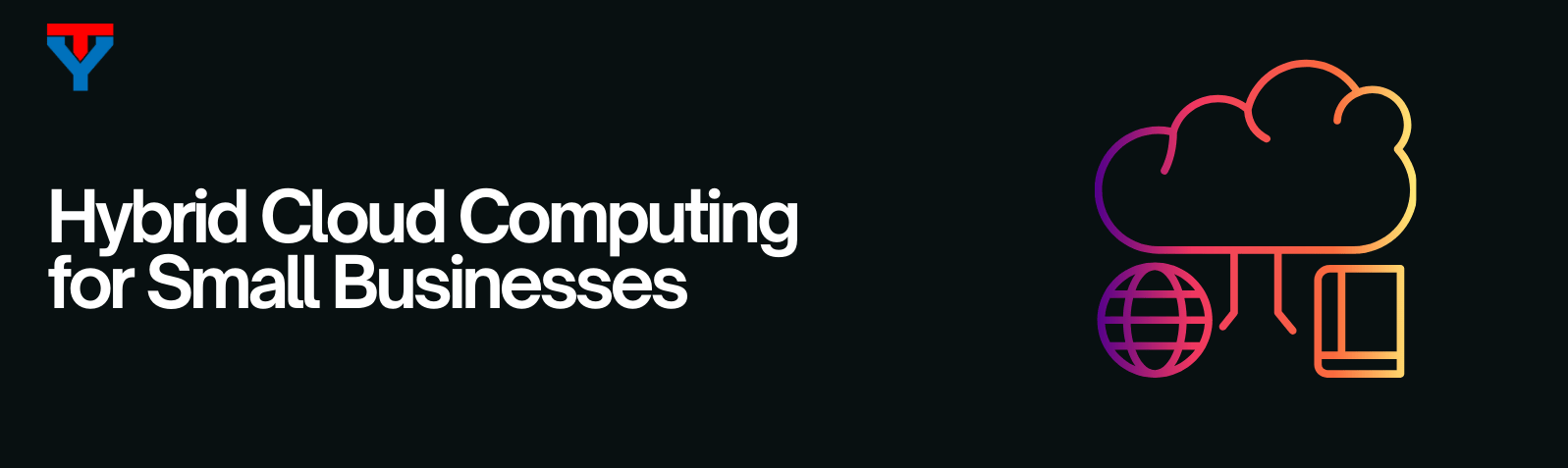
Hybrid cloud computing combines a small business’s on-premises or private infrastructure with public cloud services (AWS, Microsoft Azure, Google Cloud) through secure networking. It gives small businesses the control of private hardware for sensitive data and the on-demand flexibility of the public cloud for everything else, without having to pick only one.
Hybrid cloud computing for small business is an IT architecture that integrates multiple computing environments, typically including:
- On-premises infrastructure (physical servers located at the business site)
- Private cloud resources (dedicated cloud environments, either hosted internally or by a provider)
- Public cloud services (such as Amazon Web Services, Microsoft Azure, or Google Cloud)
These environments are connected through secure networking so that data and applications can move between them when needed. Hybrid cloud allows a business to: Keep certain systems private and under direct control while using public cloud services for flexibility, scalability, and cost efficiency.
Why Hybrid Cloud Computing for Small Business Matters
Small businesses face different constraints than large enterprises. Budgets are tighter, IT teams are smaller, and downtime or security incidents can have a much bigger impact. Hybrid cloud computing for small business addresses several common challenges:
- Reducing large upfront hardware costs
- Supporting legacy systems that cannot move fully to the cloud
- Protecting sensitive data
- Enabling remote work and online services
- Scaling without overbuilding infrastructure
Rather than forcing a full migration to the cloud or maintaining everything in-house, hybrid cloud offers a middle path that aligns technology with real-world business needs.
Hybrid Cloud vs Public Cloud vs Private Infrastructure
| Factor | Public Cloud | Private Cloud / On-Premises | Hybrid Cloud |
|---|---|---|---|
| Upfront cost | Low | High | Medium |
| Ongoing cost | Pay-as-you-go, variable | High fixed cost | Mixed and predictable |
| Scalability | Instant and almost unlimited | Limited by hardware you own | Flexible, with on-demand burst to public cloud |
| Control over data | Limited | Full | Full for sensitive data, flexible for the rest |
| Security model | Shared responsibility with provider | Fully in-house | Tunable per workload |
| Compliance fit | Fine for most, harder for strict rules | Best for regulated industries | Best of both worlds |
| Setup time | Hours to days | Weeks to months | Weeks |
| Best suited for | Startups, dev and test, variable traffic | Highly regulated industries, legacy systems | Growing small businesses with mixed workloads |
Public Cloud Only
Public cloud services are shared environments operated by cloud providers.
Advantages:
- Low startup cost
- Easy scalability
- No hardware management
Limitations:
- Less control over infrastructure
- Ongoing usage costs
- Potential compliance concerns
Private Cloud or On-Premises Only
Private infrastructure is owned or dedicated to one organization.
Advantages:
- Full control
- Strong data security
- Predictable performance
Limitations:
- High capital investment
- Limited scalability
- Requires in-house expertise
Hybrid Cloud
Hybrid cloud combines both approaches.
Advantages:
- Flexible workload placement
- Improved security and compliance
- Better cost management
- Gradual modernization
Limitations:
- More complex design
- Requires integration and planning
For many small businesses, hybrid cloud provides the most practical balance.
How Does Hybrid Cloud Work in a Small Business?
Here is how hybrid cloud for small business typically works:
- Core business systems (such as accounting, internal databases, or regulated data) run on-premises or in a private cloud
- Customer-facing services (websites, email, collaboration tools) run in the public cloud
- Cloud storage is used for backups and disaster recovery
- Secure networks connect all environments
For example:
- A healthcare clinic stores patient records locally but uses cloud scheduling and analytics tools
- A retail business hosts its e-commerce site in the cloud while managing inventory internally
- A professional services firm uses cloud backup and email but keeps financial systems private
This structure provides flexibility without sacrificing control.
Key Benefits of Hybrid Cloud for Small Business
1. Cost Efficiency and Budget Control
Hybrid cloud solutions for small business help you avoid unnecessary spending by:
- Reducing hardware purchases
- Using cloud resources only when needed
- Running predictable workloads on local systems
- Scaling temporarily during peak demand
This approach leads to more predictable IT costs.
2. Improved Security and Compliance
Many small businesses handle sensitive data, including customer information, financial records, or regulated data. Hybrid cloud allows businesses to:
- Keep sensitive data in controlled environments
- Apply stricter security policies where needed
- Use cloud services for low-risk workloads
This layered approach improves overall security while supporting compliance requirements.
3. Scalability Without Over-Provisioning
Instead of buying infrastructure for peak usage, hybrid cloud enables:
- Cloud bursting during busy periods
- Faster expansion into new markets
- Support for seasonal demand
With hybrid cloud for SMBs, you get enterprise-level scalability without long-term commitments.
4. Business Continuity and Disaster Recovery
A hybrid cloud for small business improves resilience by:
- Backing up data to the cloud
- Enabling rapid recovery after failures
- Supporting remote access during disruptions
Cloud-based disaster recovery is often far more affordable than traditional alternatives.
5. Gradual Digital Transformation
Many small businesses rely on legacy applications that are difficult to replace. Hybrid cloud allows modernization to happen gradually:
- Systems can be upgraded one at a time
- Staff can adapt at a manageable pace
- Risk is minimized
This makes transformation practical rather than disruptive.
Hybrid Cloud Computing Architecture
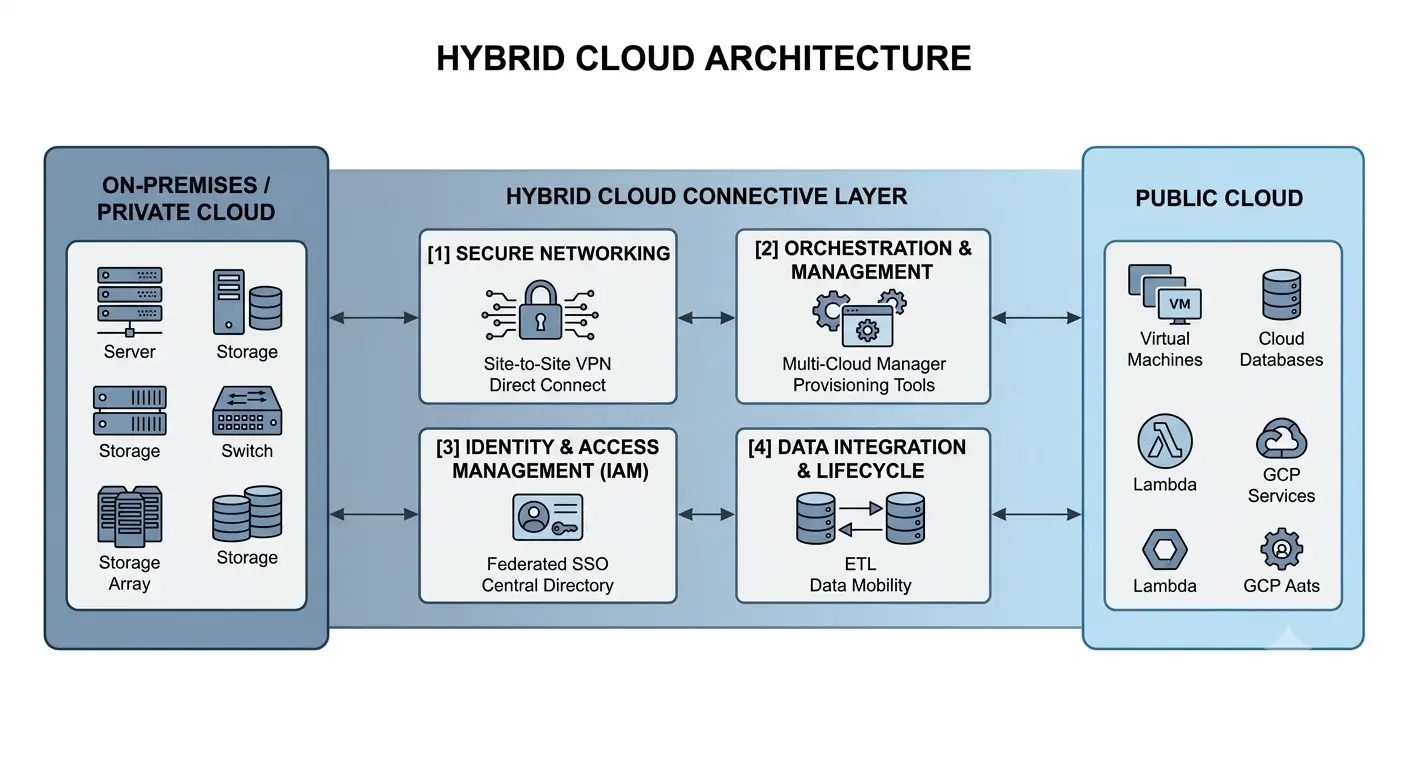
A hybrid cloud architecture has three layers working together.
1. The Private Layer: This is the infrastructure you own or lease. It can sit in your office, a co-location data centre, or a private cloud environment hosted by a provider. This is where you typically keep sensitive data, legacy applications, and anything that must stay inside a specific jurisdiction for compliance reasons.
2. The Public Cloud Layer: This is capacity you rent from providers like AWS, Microsoft Azure, or Google Cloud. You use it for workloads that benefit from elasticity, such as customer-facing websites, analytics processing, backup storage, and development environments.
3. The Connective and Orchestration Layer: This is what makes the two sides act as one. It usually includes:
- A secure network link (VPN, AWS Direct Connect, Azure ExpressRoute, or Google Cloud Interconnect)
- An identity and access management system that works across both environments
- A monitoring and observability stack that gives one view of all workloads
- Orchestration tools (often Kubernetes, Terraform, or a vendor platform like Azure Arc) that let you deploy workloads to either side from one control plane
Common Use Cases of Hybrid Cloud for Small Business
Website and Online Services
Customer-facing websites, portals, and applications can run in public cloud infrastructure while internal systems remain private. This gives the business access to cloud scalability without requiring every internal workload to move.
Backup and Data Archiving
Cloud storage can provide an off-site location for backup data and recovery resources. This is particularly useful for businesses that cannot afford extended downtime after hardware failure, accidental deletion, ransomware, or another disruption.
Email and Collaboration
Cloud-based email, file sharing, meetings, and collaboration platforms can operate independently from internal infrastructure. This allows employees to work remotely without requiring the business to move every internal application to the public cloud.
Application Development and Testing
Development teams can use cloud environments to build and test applications without changing production infrastructure. Temporary environments can also be created when needed and removed after testing is complete.
Analytics and Reporting
Some businesses can use cloud analytics services while keeping source systems in private infrastructure. The architecture can be designed so only the data required for analysis is transferred to the cloud.
Challenges of Hybrid Cloud Adoption
While beneficial, hybrid cloud for SMBs introduces some complexity.
1. Infrastructure Management
Managing on-premises and cloud environments requires more planning than operating a single environment. Teams need clear ownership, documentation, monitoring, and operational processes.
2. Security Consistency
Security controls cannot stop at the edge of the public cloud. Identity, access, encryption, network security, endpoint protection, logging, and monitoring need to work consistently across the different environments.
3. Network Dependence
Applications that communicate between private and public infrastructure depend on reliable connectivity. Network latency, outages, bandwidth limits, and configuration errors can affect application performance.
4. Skill Gaps
Small businesses may not have specialists who understand networking, cloud architecture, security, automation, and on-premises infrastructure. In those situations, external cloud expertise can help reduce implementation mistakes and operational burden.
5. Cost Visibility
Hybrid environments can make costs harder to understand. Businesses need to account for cloud usage alongside hardware, software licensing, networking, maintenance, support, and other infrastructure expenses.
Best Practices for Adopting Hybrid Cloud for Small Business
Start With Business Goals
Technology decisions should support:
- Cost reduction
- Growth plans
- Security needs
- Operational efficiency
Classify Workloads Carefully
When choosing hybrid cloud solutions for small business, remember that not all workloads belong in the cloud. Classify systems by sensitivity, performance needs, and cost predictability.
Build Security Into the Design
Implement identity management, encryption, monitoring, and backups from the beginning.
Leverage Proven Hybrid Cloud Experience
For many small businesses, the challenge is not understanding hybrid cloud in theory but implementing it correctly in practice. Organizations benefit from working with teams that have hands-on experience designing and operating hybrid environments, particularly those familiar with cloud-native infrastructure, containerization, automation, cost optimization, and reliability engineering.
Applying proven hybrid patterns helps reduce complexity, avoid misconfigurations, and ensure infrastructure evolves alongside business needs.
Plan for Long-Term Growth
Choose platforms and architectures that:
- Scale easily
- Avoid vendor lock-in
- Support future innovation
The Role of Hybrid Cloud in Small Business Growth
Hybrid cloud computing for small businesses is more than an IT solution; it is a strategic enabler.
It supports:
- Faster innovation
- Improved customer experiences
- Remote and hybrid work models
- Operational resilience
By balancing control and flexibility, small businesses can respond quickly to market changes without overextending resources.
Future Trends in Hybrid Cloud for Small Business
Hybrid cloud is continuing to evolve as cloud management tools become easier to use and businesses adopt more distributed technology environments. Hybrid cloud adoption continues to grow, driven by:
- Simpler management platforms
- Increased automation
- Better security tooling
- Clearer regulatory guidance
As technology matures, hybrid cloud will become the default model for many small businesses. For some organizations, that may mean public cloud. For others, it may be on-premises infrastructure with selected cloud services. For businesses with mixed requirements, hybrid cloud can provide a practical middle ground.
Conclusion
Hybrid cloud computing for small business offers a middle path between fully on-premises infrastructure and moving everything to the public cloud. It can help businesses modernize gradually, support variable workloads, protect sensitive systems, improve disaster recovery, and use cloud services where they provide a clear advantage.
But hybrid cloud is not automatically the best architecture for every small business. The strongest approach starts with business requirements, classifies workloads carefully, designs security and connectivity from the beginning, and keeps the environment as simple as practical.
When the architecture has a clear purpose, hybrid cloud can become a useful foundation for controlled growth and long-term technology modernization.
Hybrid Cloud Computing for Small Business FAQs
1. What is hybrid cloud computing for small business?
Hybrid cloud computing for small business combines on-premises or private infrastructure with public cloud services (such as AWS, Microsoft Azure, or Google Cloud) through secure networking. It lets a small business keep sensitive data on private hardware while using the public cloud for workloads that need elasticity, backup, or burst capacity.
2. Is hybrid cloud worth it for a small business?
For most small businesses with mixed workloads or compliance obligations, hybrid cloud is worth it. Small businesses using a hybrid model typically see a 20 to 30% reduction in total infrastructure cost over three years compared to on-premises only, plus faster disaster recovery and better scalability.
3. Can hybrid cloud actually save a small business money?
Yes, when implemented well. Fixed workloads stay on hardware you already own, and variable workloads burst to pay-as-you-go public cloud. This avoids over-buying hardware for peak demand that happens only a few times a year. Savings of 20 to 30% over three years are typical.
4. Is hybrid cloud more secure than using the public cloud?
Hybrid cloud can be more secure than public-only for small businesses that handle regulated or sensitive data, because it keeps that data on infrastructure you control. The trade-off is that your team has to manage security consistently across two environments, which requires unified identity and access management.
5. How much does hybrid cloud cost for a small business?
The cost depends on how much you keep on-site and how much you move to the cloud. Monthly costs usually include cloud storage and computing, backup, software licences, internet bandwidth and managed support. Many small businesses save money by putting off expensive server replacements and paying only for the cloud capacity they use.
6. How do I plan a hybrid cloud environment for my SMB?
Start by classifying workloads. Decide which must stay on-premises for compliance or cost reasons, which should move to public cloud for elasticity, and which can be either. Pick one workload to migrate first as a pilot. Build in security and cost tracking from day one. Expand in 90-day phases based on what you learn.